How to Implement AI Workflow Automation in Enterprise Systems
AI Workflow Automation in Enterprise Systems
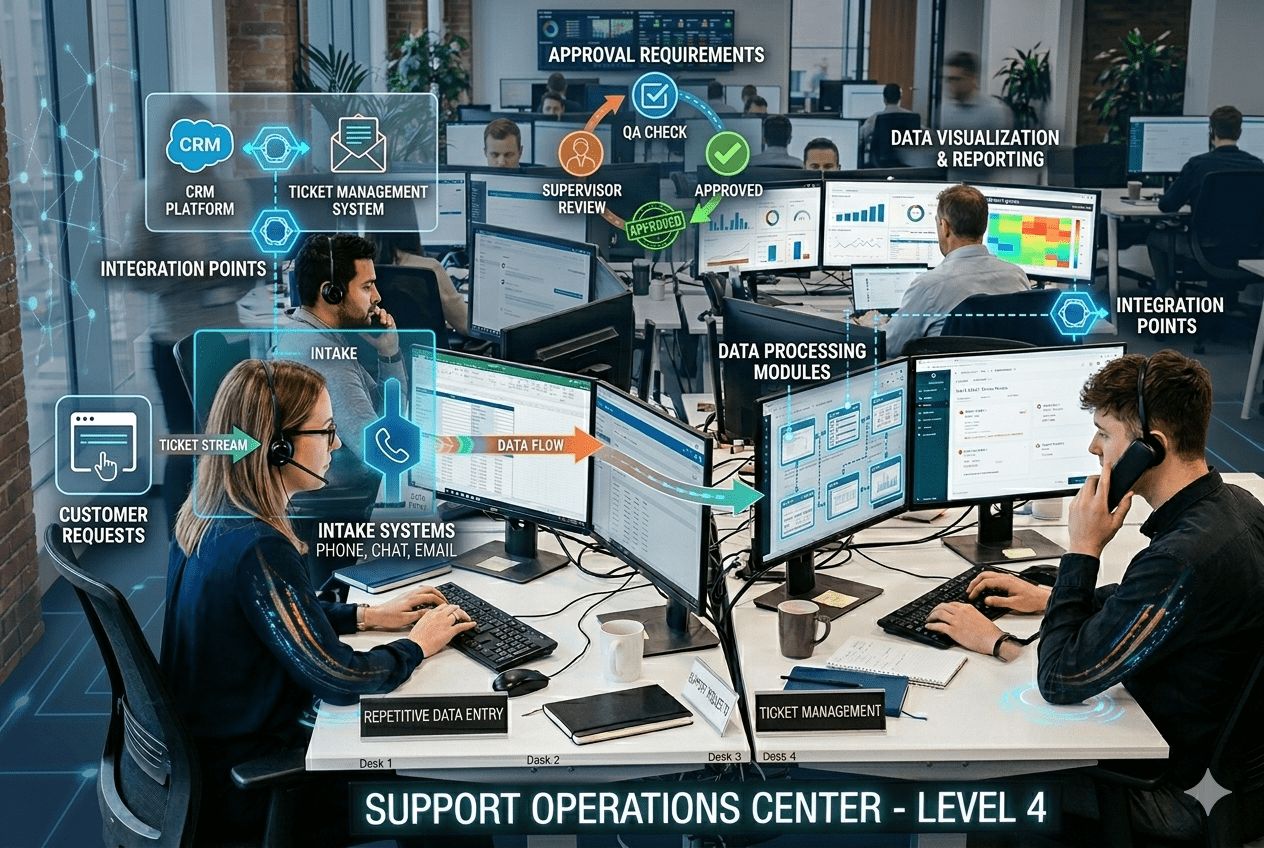
How to Implement AI Workflow Automation in Enterprise Systems

Quick Summary

  • Enterprises want to automate repetitive work but face challenges integrating AI into existing systems.
  • A structured, phased approach enables smooth AI deployment without disrupting operations.
  • Start by identifying high-volume manual tasks like data entry, reporting, support requests, and ticket management.
  • Map workflow dependencies, including systems involved, data flow, approvals, and integration points.
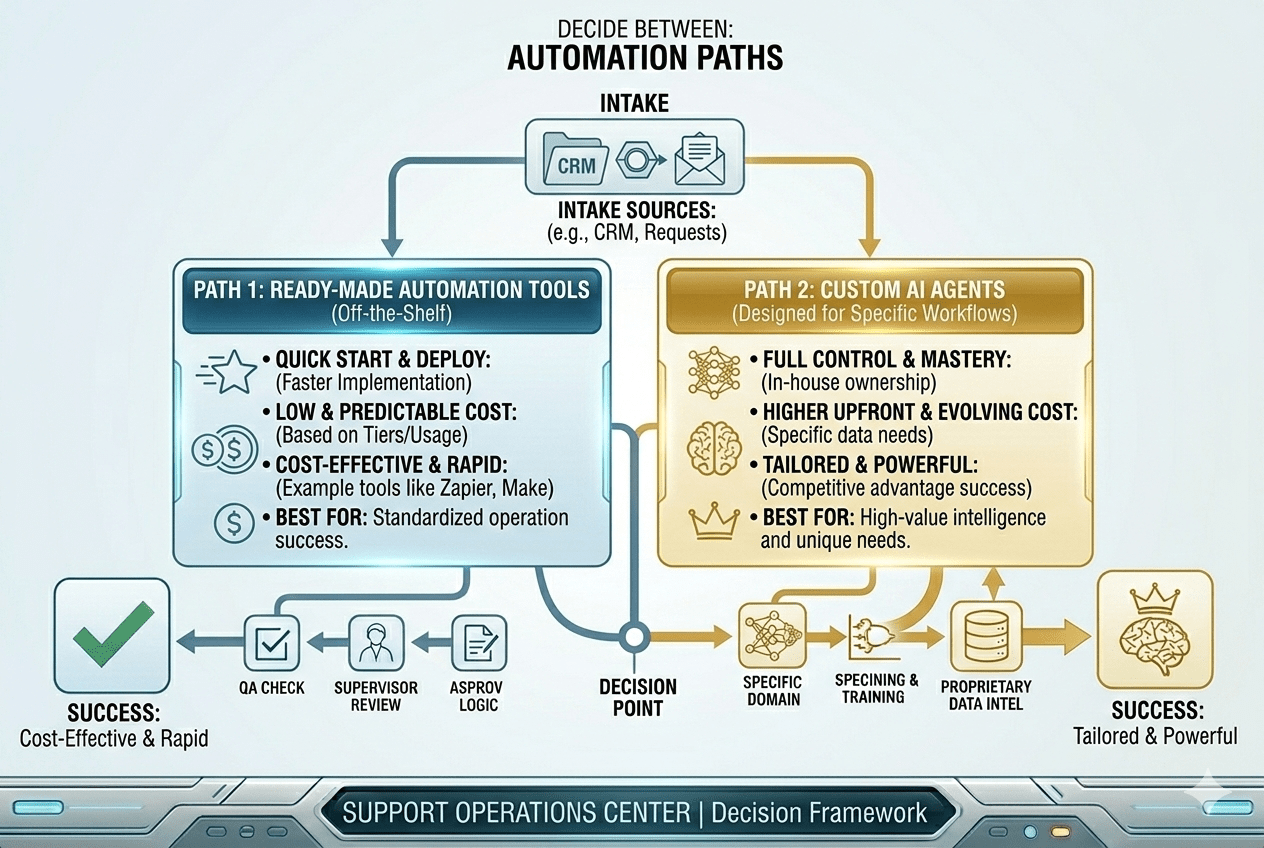
  • Choose between ready-made automation tools or custom AI agents based on business complexity.
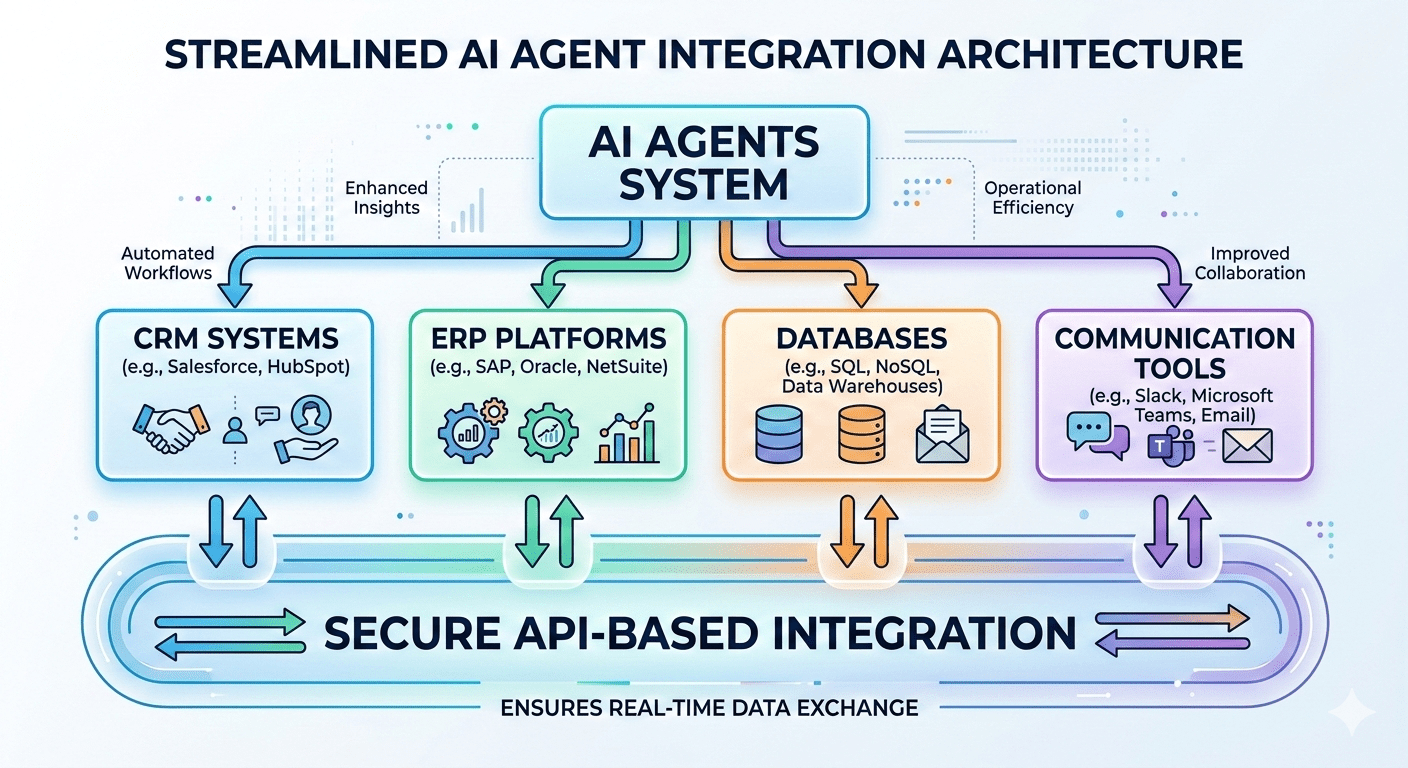
  • Integrate AI securely with CRM, ERP, databases, and communication platforms using APIs.
  • Begin with a pilot deployment, measure performance, and scale gradually.
  • Continuously monitor and optimize workflows as business needs evolve.
  • Key benefits include reduced delays, lower manual workload, improved accuracy, and better resource utilization.
  • Ensure strong security, access controls, data protection, activity logging, and compliance alignment.
  • A phased implementation helps enterprises scale AI automation safely and efficiently.

Many enterprises recognize the value of automating repetitive, time-consuming tasks such as data entry, reporting, ticket management, and routine support queries. However, despite the growing availability of AI technologies, organizations often struggle to implement AI within their existing systems. Legacy infrastructure, complex workflows, integration challenges, and security concerns can make AI adoption seem risky or disruptive. As a result, many automation initiatives stall before delivering measurable impact.

A structured and phased approach helps overcome these barriers. Instead of attempting large-scale transformation at once, organizations can begin by identifying high-impact processes, mapping system dependencies, and selecting the right automation tools or custom AI agents. Careful integration with existing platforms such as CRM, ERP, and internal databases ensures that AI solutions work seamlessly within established workflows. Running pilot deployments further reduces risk by validating performance, accuracy, and operational impact before scaling.

By following a clear framework, enterprises can deploy AI agents without interrupting day-to-day operations. This guide outlines the practical steps required to plan, integrate, test, and optimize AI workflow automation, enabling organizations to improve efficiency, reduce manual workload, and modernize operations in a controlled and sustainable way.

Step 1: Identify High-Volume Manual Tasks

Identify High-Volume Manual Tasks

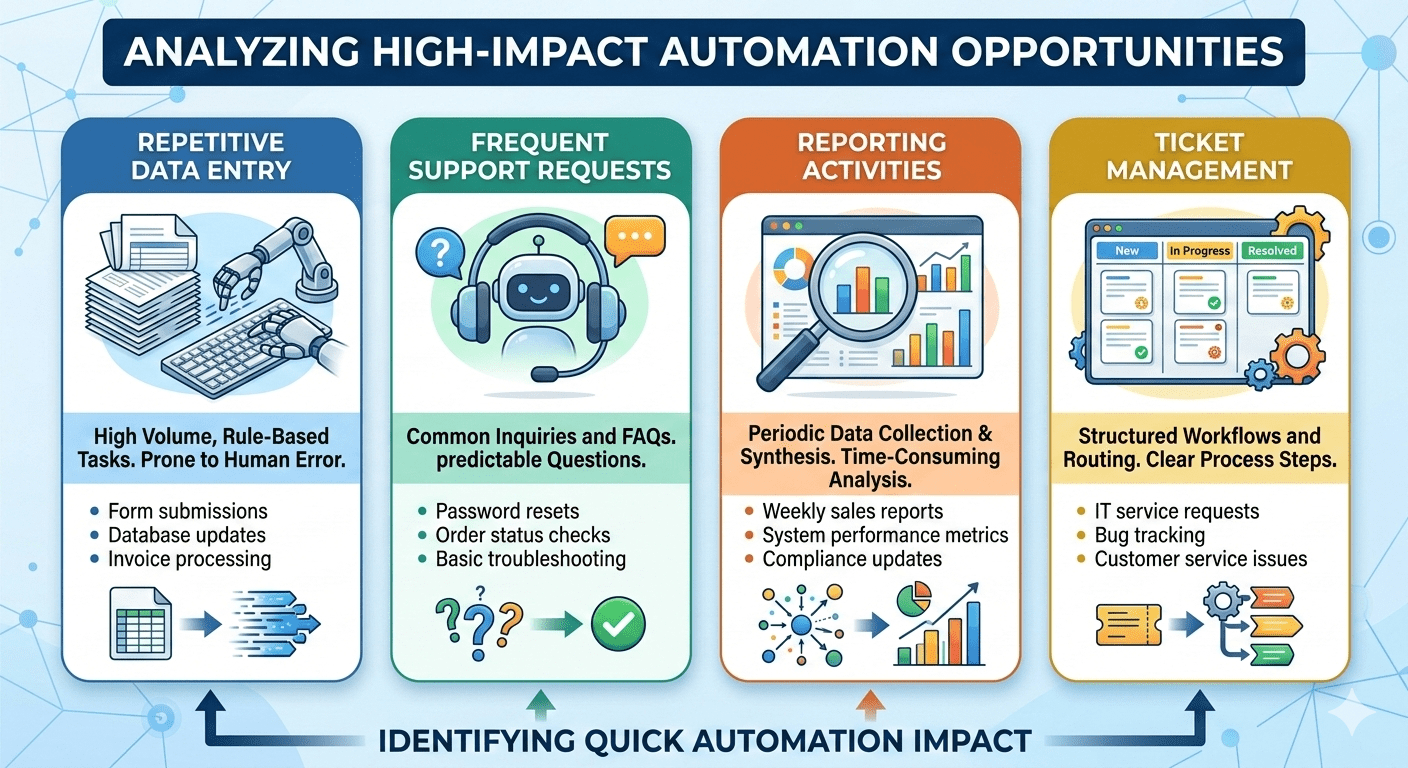
Start by carefully analyzing business processes that consume significant time and human effort. Focus on areas where tasks are repetitive, rule-based, and occur at high volume, as these are ideal candidates for automation.

  • Repetitive data entry: Manual input of data across spreadsheets, CRM systems, or internal tools increases the risk of errors and slows productivity. Automating this ensures accuracy and consistency.
  • Frequent support requests: Common customer or internal queries that follow predictable patterns can be handled by AI agents, reducing response time and workload on support teams.
  • Reporting activities: Generating routine reports often involves collecting, organizing, and formatting data tasks that AI can complete faster and more reliably.
  • Ticket management: Sorting, assigning, and updating tickets based on predefined rules can be automated to streamline service operations.

These areas typically deliver quick automation wins, demonstrating measurable efficiency improvements early in the implementation process.

Step 2: Map Workflow Dependencies

Before implementing automation, it is essential to gain a clear understanding of how existing workflows function across the organization. Mapping dependencies ensures that AI agents integrate smoothly without disrupting interconnected processes.

  • Which systems are involved: Identify all platforms that support the workflow, such as CRM, ERP, databases, HR systems, or communication tools. Understanding system interactions helps define technical requirements.
  • Where data flows: Track how data moves between systems, teams, and approval stages. This ensures automation captures the complete process rather than only isolated tasks.
  • Approval requirements: Document decision points, authorization levels, and compliance checks that must be maintained within automated workflows.
  • Integration points: Determine where APIs or connectors are required to enable seamless data exchange between systems.

Clear and detailed workflow mapping prevents automation gaps, reduces implementation risks, and ensures AI solutions operate accurately within the broader enterprise ecosystem.

Step 3: Select the Right Automation Approach

Select the Right Automation Approach

Choosing the right automation strategy is critical to achieving long-term success. Organizations must evaluate their operational complexity, scalability needs, and integration requirements before deciding on the appropriate solution.

  • Ready-made automation tools: These platforms offer prebuilt features and faster deployment. They are suitable for standard, repetitive processes with minimal customization needs. Businesses can implement them quickly, reduce upfront costs, and benefit from vendor support and regular updates. However, they may have limitations when workflows are highly specialized or involve multiple interconnected systems.
  • Custom AI agents designed for specific workflows: Custom solutions are tailored to unique business processes, integration environments, and decision logic. They provide greater flexibility, deeper system integration, and scalability aligned with long-term goals. While development may require more planning and investment, the outcome often delivers higher efficiency and better alignment with internal operations.

Enterprises with complex workflows, regulatory requirements, or multi-system dependencies often benefit more from customized AI solutions.

Step 4: Integrate with Existing Platforms

For AI workflow automation to deliver real value, AI agents must integrate seamlessly with the systems already used across the enterprise. Effective integration ensures smooth data exchange, consistent decision-making, and minimal operational disruption.

  • CRM systems: AI agents can update customer records, track interactions, trigger follow-ups, and analyze engagement patterns. Integration with CRM platforms ensures sales, marketing, and support teams always work with accurate, real-time customer data.
  • ERP platforms: Connecting AI to ERP systems allows automation of finance, procurement, inventory, and supply chain processes. AI can process transactions, validate entries, and generate insights without manual intervention.
  • Databases: Direct database connectivity enables AI agents to retrieve, validate, and update structured data efficiently. This ensures consistency across applications and supports data-driven decision-making.
  • Communication tools: Integration with email, chat, and collaboration platforms allows AI to send alerts, respond to queries, assign tasks, and notify stakeholders instantly.

Secure API-based integration is essential to maintain data integrity, enable real-time synchronization, and ensure compliance with enterprise security standards.

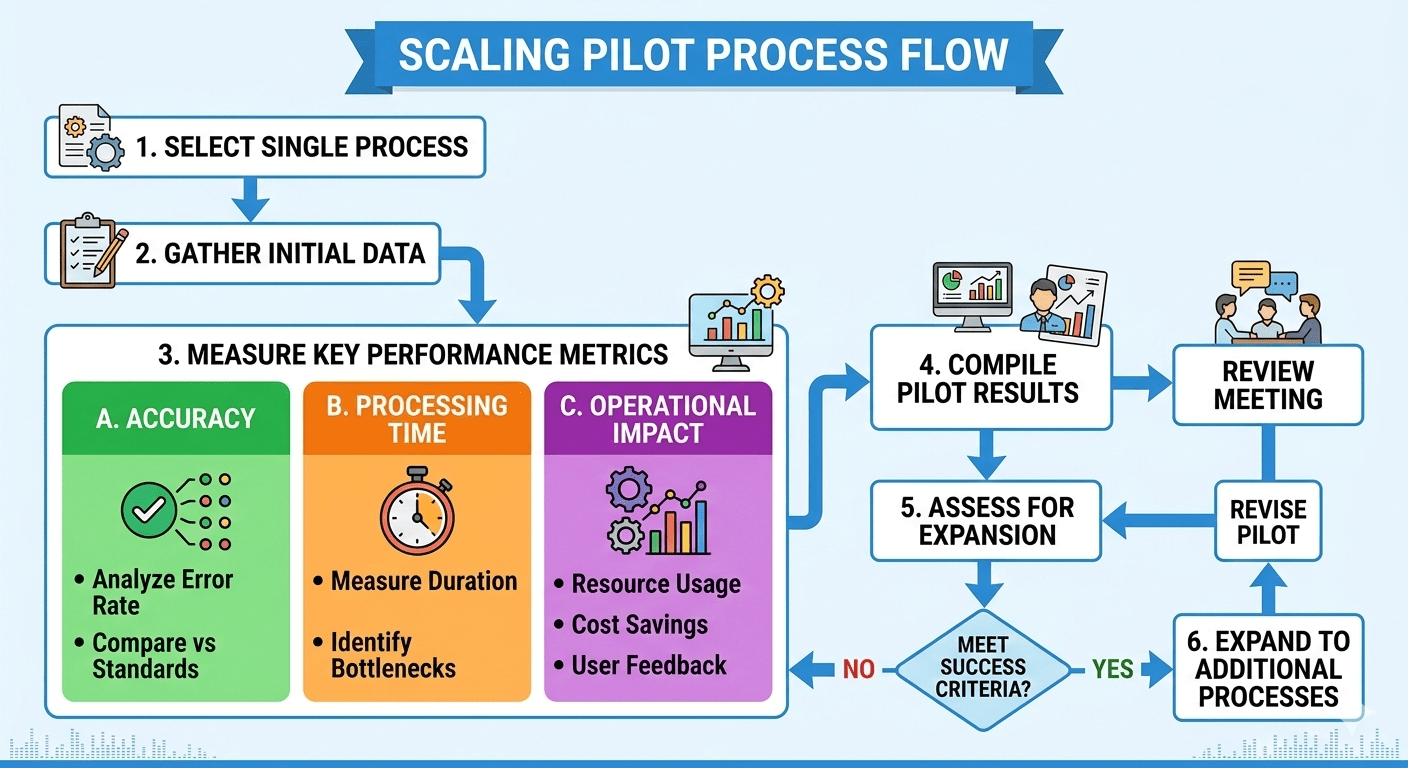
Step 5: Run a Pilot Deployment

Run a Pilot Deployment

Begin automation with a single, well-defined process rather than attempting organization-wide implementation. A focused pilot reduces risk, allows teams to validate assumptions, and provides measurable insights before scaling further. Selecting a process with clear inputs, outputs, and performance metrics makes evaluation more effective.

Measure key performance indicators during the pilot phase to assess real impact:

  • Accuracy: Evaluate how correctly the AI agent performs tasks compared to manual execution. Monitor error rates, data consistency, and decision reliability to ensure quality standards are maintained or improved.
  • Processing time: Compare the time required to complete tasks before and after automation. Faster turnaround times often demonstrate immediate efficiency gains and improved responsiveness.
  • Operational impact: Assess how automation affects team productivity, workload distribution, and overall workflow efficiency. Identify whether it reduces bottlenecks or improves service levels.

Use pilot results to refine workflows, adjust rules, and address integration issues. Once performance meets expectations, expand automation gradually to additional processes with greater confidence and control.

Step 6: Monitor and Optimize

AI workflow automation is not a one-time implementation but an ongoing process. Organizations must track performance continuously to ensure AI agents deliver consistent, accurate, and efficient outcomes. Regular monitoring helps identify performance gaps, unexpected errors, or changing operational demands. As business requirements evolve, workflows and decision rules should be adjusted to maintain alignment with organizational goals. Continuous optimization ensures automation remains relevant, scalable, and capable of adapting to new regulations, systems, or market conditions.

Business Benefits

  • Reduced operational delays: Automated workflows minimize bottlenecks by processing tasks instantly and consistently, improving turnaround times.
  • Lower manual workload: AI agents handle repetitive tasks, allowing employees to focus on strategic and high-value activities.
  • Improved process accuracy: Automation reduces human errors in data entry, reporting, and task routing, enhancing reliability.
  • Better resource utilization: Teams, time, and technology resources are allocated more efficiently, improving overall productivity and cost-effectiveness.

Security and Governance

To ensure responsible automation, enterprises must implement strong governance measures:

  • Access controls: Define user permissions to prevent unauthorized system access.
  • Data protection measures: Safeguard sensitive information through encryption and secure data handling practices.
  • Activity logging: Maintain audit trails to track automated actions and ensure transparency.
  • Compliance alignment: Ensure AI workflows adhere to industry regulations and internal policies.

Conclusion

AI workflow automation helps enterprises boost efficiency without replacing existing systems. By automating repetitive tasks like data entry, reporting, ticket management, and support handling, organizations can reduce errors, save time, and free employees for higher-value work. A phased implementation approach ensures safe, controlled adoption. Starting with pilot deployments allows teams to monitor performance, refine workflows, and address integration issues before scaling. Gradually extending automation across departments ensures seamless operation with CRM, ERP, databases, and communication tools. This step-by-step strategy minimizes risk, maintains compliance, optimizes resources, and enables organizations to achieve measurable productivity gains while preserving existing technology investments.

FAQs

1. How long does it typically take to implement AI workflow automation?

Implementation timelines vary depending on process complexity and system integration. Starting with a pilot deployment usually takes a few weeks, while scaling across departments can take several months. A phased approach ensures minimal disruption and measurable results at each stage.

2. Can AI automation work with legacy systems?

Yes. With secure API-based integration, AI agents can connect to existing CRM, ERP, databases, and communication tools, allowing enterprises to modernize workflows without replacing legacy infrastructure.

3. How do organizations measure the success of automation?

Success is measured by accuracy, processing speed, reduction in manual workload, operational impact, and improved resource utilization. Continuous monitoring and optimization are essential to sustain long-term benefits.

4. What role does security play in AI workflow automation?

Security is critical. Access controls, data protection, activity logging, and compliance alignment ensure that automation does not introduce vulnerabilities or violate regulations.

5. Is AI workflow automation suitable for all business sizes?

Yes. Both small and large enterprises can benefit. While smaller organizations may start with a few key processes, larger enterprises often implement customized AI agents to handle complex, interconnected workflows.

Rate this article